





Planning a wedding is rarely a one-person job. Even when one partner takes the lead, decisions quickly involve parents, friends, vendors, and anyone helping with money or logistics. I found Wedding Planner by WeddingWire most useful as a personal planning workspace that can also support those conversations, rather than as a complete replacement for every message, spreadsheet, or appointment.
The app comes from Wedding Planner by WeddingWire and sits in the events category. It is free to use, carries an Everyone age rating, and has been available since June 18, 2012. Its current version is 8.30.0, with support for operating systems from version 9 onward. That combination makes it approachable for many households, especially when more than one person is checking plans from different phones.
At its best, the app turns a vague, emotional project into a set of visible tasks. Venues, deadlines, spending, and the countdown all have a place. I would not call it a substitute for careful conversations, but I do recommend it to couples who want one practical starting point instead of scattered notes and browser tabs.
How the app works when wedding planning is shared
A realistic household scenario is easy to imagine. One partner is comparing venues during a lunch break, the other is handling budget decisions after work, and a parent wants to know whether a major booking has been made. Without a central planning tool, each person may keep a separate list. That creates small misunderstandings: one person thinks a task is finished, another forgets a deadline, and a third remembers a cost differently.
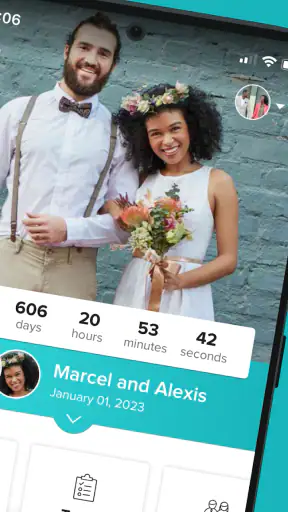
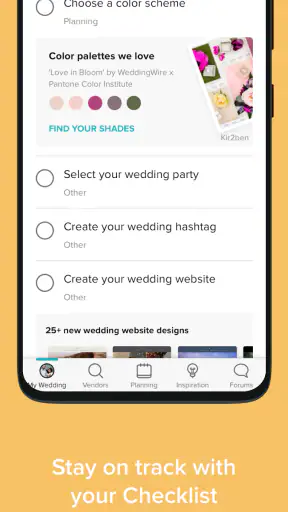
Wedding Planner by WeddingWire helps by putting the main planning subjects together. I found the combination of a wedding checklist, budget planning, venue information, and a countdown more useful than any one feature alone. The countdown keeps the date visible, while the checklist gives that date practical meaning. A budget view then adds a reality check before enthusiasm turns into a series of expensive commitments.
The strongest use case is not simply opening the app every day. It is using it during a short weekly planning session. I would review upcoming tasks, mark which decisions need both partners, check whether planned spending still makes sense, and then use the venue information to prepare the next conversation. That routine prevents the app from becoming another forgotten download.
For a couple sharing a tablet or household phone, the app can also act as a neutral reference point. Instead of asking, “Did we deal with that?” you can look at the relevant planning area together. This is especially helpful when one person is more detail-oriented and the other prefers broad decisions. The first person gets structure; the second gets a clearer view of what actually needs attention.
There is an important limitation, though. A planning app cannot settle disagreements about guest numbers, priorities, or family expectations. I would use it to expose the decision, not to hide the discussion behind a completed checkbox. A task marked done is only useful if everyone who matters understands what was decided.
Starting with the checklist instead of the countdown
The countdown is the most immediately appealing part of the experience, but I would not make it the first place to spend time. A large number can create pressure without telling you what to do next. The checklist is more valuable at the beginning because it turns the wedding into manageable actions.
My preferred approach would be to scan the full list before making changes. That gives a sense of the planning journey and helps identify tasks that depend on earlier decisions. For example, venue research naturally affects the date, location, guest assumptions, and later vendor conversations. Treating every item as an isolated chore can lead to duplicated work.
A useful household habit is to divide tasks by decision style rather than simply by person. One partner might handle research-heavy items, while both partners reserve time for choices that affect the guest experience. This avoids the common problem where one person becomes the project manager and the other only hears about decisions after they are made.
I also recommend using the checklist as a conversation agenda. Before a weekend planning session, choose a small group of related tasks rather than attempting to solve the whole wedding. That makes the app feel less overwhelming and gives each session a clear ending. The value comes from the rhythm it creates, not from checking every box as quickly as possible.
Another practical tip is to treat completed items as records of decisions, not proof that the entire topic is finished forever. A venue may be chosen, but questions about access, timing, guest movement, or final payments can still matter later. The checklist is excellent for preventing broad categories from being forgotten; it is less suitable as a detailed contract-management system.
Using the budget without letting it create false confidence
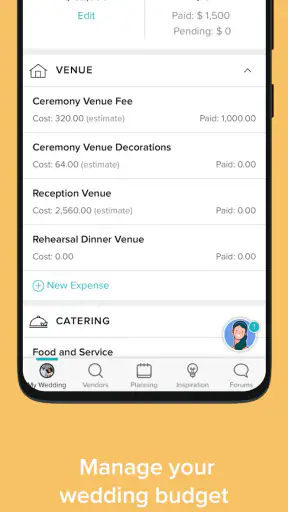
The budget feature is helpful because wedding spending tends to expand through small additions. A single extra service may seem harmless, but several “small” choices can change the overall picture. I like having a dedicated place to consider costs while planning instead of relying on memory or a general household spreadsheet.
Still, I would not treat the app’s budget area as the final financial authority. Before committing money, I would keep invoices, payment dates, deposits, cancellation terms, and notes about who is paying in a separate, carefully maintained record. The app can support the overview, but formal financial details deserve more precision than a quick planning entry.
This distinction matters in a shared household. If one partner enters an expected amount and another assumes it is a confirmed price, tension follows. I would label conversations clearly: estimated, quoted, paid, or still under discussion. Even if the app gives you a convenient budget view, the household should agree on what each number means.
The budget is particularly useful when comparing venues. A venue that looks affordable at first may affect transport, catering, decoration, or accommodation decisions. I would enter the likely total impact rather than judging a venue only by its headline cost. That is one of the better ways to use the app’s planning structure: not to predict the future perfectly, but to slow down impulsive decisions.
For couples with very different money habits, the budget can provide a less personal way to begin the conversation. Instead of accusing someone of overspending, you can review the same planning picture. It will not resolve different values, but it can make the trade-offs visible. In my experience, visibility is often the first step toward a useful compromise.
Venue research and the trade-off between discovery and verification
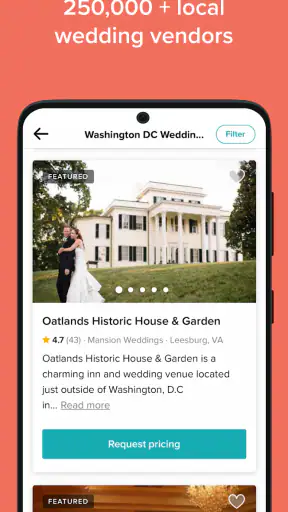
Venue information is one of the reasons I would choose this app over a blank notes document. Starting with wedding-specific options is more efficient than searching the wider web without a plan. It gives the planning process a relevant direction and can help couples compare possibilities before contacting anyone.
However, discovery is not the same as verification. I would always confirm important details directly with a venue before relying on them: availability, included services, restrictions, payment expectations, and the exact terms of any offer. Information that helps you find a venue should begin the conversation, not end it.
A good workflow is to shortlist only a few realistic options, then record questions for each one. Consider the guest list, travel needs, ceremony and reception arrangements, and whether the location suits the kind of day you actually want. This prevents the common trap of collecting attractive venues without making progress toward a decision.
The app is more useful when you bring your own criteria to it. If you browse without knowing what matters, the number of possibilities can become distracting. I would decide in advance which factors are non-negotiable and which are flexible. That turns venue browsing from entertainment into a decision-making exercise.
For a shared device, this is also a good moment to agree on boundaries. One person can browse and save ideas, but neither partner should assume that saving a venue means the other person has approved it. A saved option is a prompt for discussion. Keeping that distinction clear avoids accidental commitments and makes the app safer as a collaborative planning aid.
Coordination across partners, relatives, and helpers
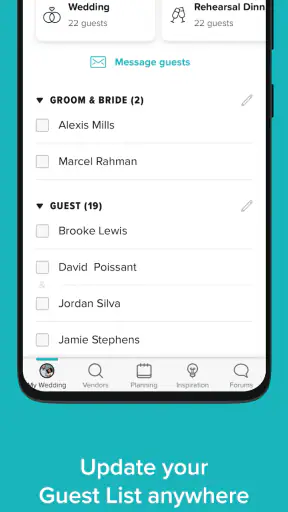
Wedding planning often includes people who are not part of the couple’s daily household. A parent may help financially, a friend may organize an event, or a relative may have strong opinions about the venue. The app can help the couple prepare for those conversations, but I would be selective about how much information is shared and with whom.
In a household, I would establish a simple rule: the app is the couple’s planning reference, while invitations, messages, and formal agreements remain separate. That keeps the central plan from becoming a public noticeboard where every suggestion looks like a commitment.
Another useful habit is to distinguish “need a decision” from “need an update.” These are not the same. A partner may only need to know that venue research is underway, while both partners need to participate before a booking or major expense. The checklist can support this distinction if you use it deliberately, even though the app should not be expected to manage every conversation automatically.
I would also avoid using the app as a substitute for a shared calendar. A checklist tells you what needs attention, but appointments and time-specific commitments often belong in a calendar that the relevant people already check. Using both tools is less elegant than having one perfect system, but it is more realistic. The wedding planner handles planning categories; the calendar handles actual moments.
For couples who live apart, the app can still be useful as a common reference during calls. One person can open the budget while the other reviews the same decision by phone. That is less efficient than a fully collaborative project-management platform, but it may be enough for couples who want wedding-specific structure without learning a complicated system.
Age, trust, and shared-device boundaries
The Everyone rating makes the app suitable for a broad audience, but that does not mean every household should treat it as a child-oriented tool. Wedding planning involves personal preferences, guest details, financial discussions, and family relationships. I would use normal device privacy habits and avoid leaving a planning phone unlocked in a public or shared setting.
On a household device, account boundaries matter. I would decide whose device contains the main planning record and who is responsible for keeping entries current. If several people casually edit or interpret the same information, confusion can grow quickly. Clear ownership is more important than giving every helper access to every detail.
This is also where trust becomes practical rather than emotional. If one partner enters a budget figure, the other should know whether it is a guess, a quote, or a confirmed payment. If a relative suggests a venue, that suggestion should remain a suggestion until the couple agrees. The app can organize information, but it cannot determine who has authority to make a decision.
I would be comfortable letting a teenager in the household browse wedding ideas under supervision, especially if they are helping with creative planning. I would be more cautious about leaving financial or guest-related discussions open on a shared screen. The age rating describes general suitability; it does not remove the need for sensible household boundaries.
Families should also remember that different generations may prefer different tools. Someone who rarely uses apps may respond better to a short printed summary or a conversation. I would not force every participant into the planner. Keep the main record orderly, then communicate the relevant part in the format each person can actually use.
What the free app does well, and where another tool is better
Being free is a meaningful advantage for an app that may be used for only one major life project. You can try its planning approach without adding another subscription to an already expensive process. That makes it a sensible first step for couples who are unsure whether they need dedicated wedding software.
Its wedding-specific structure is also more immediately useful than a blank task manager. A general notes app gives you freedom, but that freedom can become work: you must design the categories, remember the major planning areas, and decide how to track progress. This planner gives the wedding context first, which helps people who want guidance rather than a blank page.
A spreadsheet remains better for couples who need detailed financial analysis, custom formulas, or a precise record of contributions. A general project-management platform may be stronger when many people need assigned responsibilities, comments, attachments, and complex deadlines. A shared calendar is better for appointments. I would combine those tools only when the wedding’s complexity justifies it.
The planner is a better fit when the main problem is organization, not advanced collaboration. It gives a couple a focused place to begin, helps them remember broad responsibilities, and keeps the countdown connected to practical work. It is less compelling for a professional planner or a large event team that already relies on established systems.
Its large user base suggests that the basic concept has broad appeal: the app has passed one million installs, holds a 4.7 average from around 9,400 ratings, and has around 2,700 written reviews. I see those figures as signs that many people find the format approachable, not as a guarantee that it will match every planning style.
Who should use it and who should skip it
I would recommend Wedding Planner by WeddingWire to an engaged couple that wants a guided overview of the process, needs a starting point for venue research, and prefers a focused wedding tool over building a system from scratch. It is especially useful when one partner is carrying too much of the mental load and both people need a visible list of shared decisions.
It also suits households where planning happens in short sessions. If you have ten minutes before work or a quiet half-hour on the weekend, the checklist and budget areas give that time a clear purpose. The app does not require you to solve the entire wedding at once, and that is one of its most practical strengths.
I would skip it as the main system if your event requires extensive vendor documentation, detailed financial modeling, complex permissions, or a large team with different responsibilities. In that situation, a spreadsheet, shared drive, calendar, or project-management service may be a better foundation. You could still use this app for inspiration or a high-level overview, but it should not carry the whole operation.
I would also skip it if you dislike guided planning and already have a carefully maintained system that everyone follows. Adding another place to update information can create more work than it removes. The best planning tool is the one your household will actually keep current.
My household verdict
After looking at it as both a wedding planner and a shared household tool, I see a clear purpose: it reduces the friction of getting organized at the beginning and keeps major planning themes together. The checklist gives structure, the budget encourages realistic thinking, venue information supports discovery, and the countdown adds a sense of movement.
My main advice is to define its role before you begin. Use it as the couple’s planning dashboard, not as a complete archive of contracts, a replacement for a calendar, or an automatic decision-maker for relatives. Keep financial proof and formal agreements elsewhere, verify venue details directly, and make sure everyone understands whether an entry is an idea, an estimate, or a confirmed choice.
The app is free, rated for Everyone, and available on devices using operating system version 9 or later. With its current version at 8.30.0, it is a reasonable low-risk option for couples who want to see whether a dedicated wedding planner improves their routine. I would start with the checklist, add the budget honestly, and use the countdown only after the basic planning path is clear.
My final opinion is positive but measured. Wedding Planner by WeddingWire is most valuable when it turns shared intentions into shared actions. It will not replace judgment, communication, or careful verification, but it can give a busy household a calmer place to begin. For couples who want a wedding-focused organizer without paying for a more elaborate project system, it is worth trying.


